

BUILD AND MARKET YOUR SHOPIFY STORE
We help e-commerce brands maximise growth opportunities


Google Shopping for Shopify: Setup and Feed Optimisation
Key Takeaways
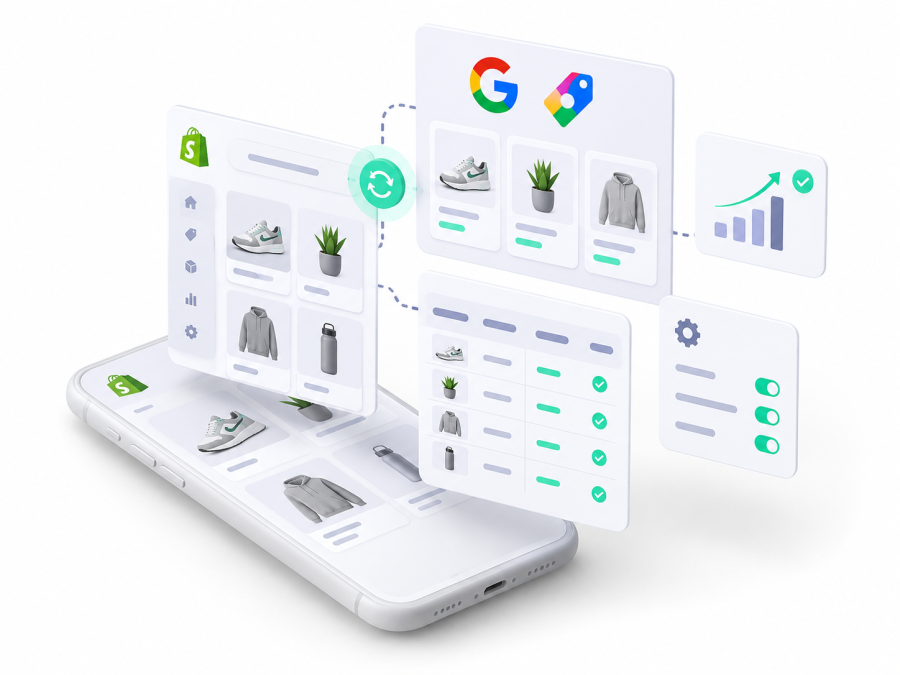
- One Merchant Center feed powers three things: free listings at no media cost, paid Standard Shopping and retail Performance Max, so feed quality decides how all three perform.
- Shopify's Google and YouTube channel syncs products, delivery and store details automatically, but the store needs a refund policy, terms of service, a contact method and a working payment provider first.
- UK prices submitted to Merchant Center must include VAT, and they have to match the product page, so sales and Markets pricing changes are a common cause of disapprovals.
- Google now assigns a product category automatically, so the category attribute is optional and only needed to override specific cases.
- From 31 January 2027, product images must be at least 500 by 500 pixels, with warnings already showing in Merchant Center since 14 April 2026.
- Across the 23 Shopify stores we connected to Merchant Center this year, roughly 30% of products were disapproved at first connection, most often because the barcode field was empty.
Quick Answer
To use Google Shopping on a Shopify store, install the Google and YouTube sales channel, connect or create a Merchant Center account, set delivery and returns, choose the markets to sync, then let your products sync and clear anything flagged in Needs attention. That gets you eligible for free listings. Paid Shopping and Performance Max come next, and the work that decides how well they perform is the feed itself: product names, identifiers, variants, images and custom labels.
Table of Contents
- How Google Shopping Works for a Shopify Store
- What You Need Before You Start
- How to Connect Shopify to Google
- How to Fix Disapprovals and Warnings
- Product Names That Win the Right Searches
- Product Copy, Types and Categories
- GTINs, Brand and MPN
- Variants, Sizes and Colours
- Images That Pass and Perform
- Custom Labels for Margin, Bestsellers and Seasonality
- When a Feed App Beats the Google Channel
- Launching Your First Shopping Campaign
- Why Matters Perspective
- Frequently Asked Questions
- Final Thoughts
- Related Articles
Connecting Shopify to Merchant Center is the easy half. The half that decides performance is the product data, because Google uses the product information you submit, not keywords, to match products to searches, and incomplete data means limited eligibility, odd looking listings or outright disapprovals. This guide covers the setup, then the optimisation, with the Shopify specifics that generic Shopping guides leave out.
How Google Shopping Works for a Shopify Store
Your Merchant Center product data feeds three separate routes to shoppers, and it is worth knowing which is which before you spend anything.
| Route | Cost | What you control |
|---|---|---|
| Free listings | No media cost | Eligibility only, through product data quality |
| Standard Shopping | Paid campaign | Products, structure, bids, budget, negatives, location |
| Retail Performance Max | Paid campaign | Budget, feed, assets, goals, country |
Free listings are normally on by default for new Merchant Center accounts, and Google says eligible products can appear across Search, the Shopping tab, Images, Lens, YouTube, Maps and Gemini. Eligibility is not a guarantee that every product appears. Standard Shopping turns the same data into paid product ads showing an image, name, price and store, while retail Performance Max uses the feed alongside your budget, assets and target country across Google's channels. One feed, three uses, which is why feed work is the highest leverage job in ecommerce PPC.
What You Need Before You Start
Shopify sets out requirements for the Google and YouTube channel that catch a surprising number of stores. The store must be publicly accessible with a working payment provider, and it needs a refund policy and terms of service reachable from the storefront footer, plus at least one customer facing contact method such as an email address, phone number, address or contact form. Google separately expects your return and refund position to be clear on the site.
You also need a Merchant Center account with a claimed domain, which Shopify can create and claim during setup unless the domain already sits in another account. Delivery can sync from Shopify or be configured in Merchant Center, and Google asks that delivery costs match what shoppers see at checkout, with return policy settings configured in both places. Two UK specifics matter: prices submitted to Merchant Center must include VAT, as Google requires for countries outside the US and Canada, and if you sell internationally through Shopify Markets, each target country has its own language, currency, delivery and product data expectations.
How to Connect Shopify to Google
The setup itself takes about twenty minutes, and the order matters:
- Install the Google and YouTube channel in your Shopify admin, then start the guided setup.
- Connect the right Google account. Shopify only shows Google accounts linked to the login you connect, so use a company controlled login rather than a personal one, and expect identity or phone verification.
- Connect or create Merchant Center. Shopify will create an account if you do not have one, and claim your domain where it is free to claim.
- Set delivery and returns, either by letting Shopify sync them or by configuring them in Merchant Center.
- Choose markets and languages. Shopify can sync these from Markets automatically, or you can select them yourself.
- Sync products. Products available to the Online Store sync automatically unless you change availability, so exclude anything you cannot advertise, cannot supply or would rather not sell in that country.
- Check status. Products from an ecommerce platform can take up to three days to appear, and the first review takes roughly three to five working days.
Shopify's connection guide walks through the same steps, and Google explains the sync timing. Resist the urge to sync everything on day one. A smaller, clean, fully approved catalogue performs better than a large one with a third of the products disapproved.
How to Fix Disapprovals and Warnings
Expect problems at the first sync. Across the 23 Shopify stores we connected to Merchant Center this year, roughly 30% of products were disapproved on connection, and the most common single cause was an empty barcode field, which leaves Google without the identifier it expects. That share falls quickly once the source data is fixed, but it does mean the day you connect is not the day you launch. Across all the disapprovals we fixed this year, not just at first connection, shipping settings were the biggest cause at 40%, with missing barcodes and policy issues at 30% each, as our Merchant Centre guide explains.
Needs attention in Merchant Center is where those problems surface, and account level policy issues come first because they can affect everything else. The table covers the causes we see most often on Shopify stores.
| Problem | Usual Shopify cause | Fix |
|---|---|---|
| Missing GTIN or MPN | Empty barcode field | Add the real barcode, or supply brand and MPN |
| Price mismatch | Sale, Markets pricing or variant price | Match the submitted price to the page |
| Availability mismatch | Stock changed or page loads slowly | Sync stock and check the page loads |
| Landing page error | Product hidden from a channel | Make it available to Online Store and Google |
| Image overlay | Sale badge or logo on the main image | Use a clean primary image |
| Variant confusion | Missing item group or option data | Send item group ID, colour and size |
Two points save a lot of repeat work. First, Google compares submitted prices with the landing page and compares availability too, and notes that a slow page can make availability harder to read, so page speed is a feed issue as well as a conversion issue. Second, fix problems at source. Google recommends managing product data in the platform that feeds it, so a correction made in Merchant Center alone will be overwritten at the next sync.
Product Names That Win the Right Searches
Product names do more work than any other attribute, because they carry the words shoppers actually type. Google allows up to 150 characters and recommends putting the most important information first, since shoppers may only see the first 70 characters depending on the format and screen. A pattern that works for most ecommerce catalogues is brand, then product type, then the key attribute, then size or colour: "Acme Waterproof Women's Walking Jacket, Navy, Size 12" earns far more relevant impressions than "Storm Pro", which tells Google and the shopper nothing.
Where you edit the name matters too. The Shopify product name also appears on your product page and in collections, so an ideal feed name is not always an ideal page name. Shopify's channel lets you optimise the names and descriptions sent to Google separately, and a feed app gives you rules that do the same thing across thousands of products. Whatever route you choose, Google expects the name to describe the product accurately and to match the landing page.
Product Copy, Types and Categories
The description attribute allows up to 5,000 characters, and Google asks that it describes the product rather than carrying shop links, competitor mentions or promotional filler. Use it for materials, features, dimensions, intended use, compatibility, ingredients, care instructions and what is in the pack, because that is the detail shoppers search with.
Product type is your own classification, and Google says the first value can be used to organise bidding and reporting, which makes it genuinely useful for campaign structure. Google product category is different: every product is now assigned a category automatically from Google's taxonomy, so the attribute is optional and exists mainly to override the automatic choice, for example where a category carries extra required attributes, where your campaigns are built on categories, or for alcohol, which must be categorised correctly. In the UK you can also use the category to organise product groups in Shopping campaigns.
GTINs, Brand and MPN
A GTIN is the Global Trade Item Number, covering EAN, UPC, ISBN and 14 digit formats, and Google requires one for new products where the manufacturer has assigned it. In Shopify it lives in the barcode field, on the product or on each variant, and variants of the same product often carry different manufacturer codes, so they need their own values rather than a copy of the parent code. Never invent a number to clear a warning, because an incorrect GTIN can get the product disapproved.
Brand and MPN cover the rest. Google normally expects a recognised brand for branded products, lets you use your own brand for genuine own label goods, and tells you not to use placeholders like "N/A", "No brand" or "Generic". Where a product genuinely has no GTIN, an accurate brand and manufacturer part number can do the job instead. One Shopify trap is worth checking: the Vendor field often feeds the brand attribute, but plenty of stores use Vendor for a supplier or an internal grouping, so confirm what is actually reaching Google rather than assuming.
Variants, Sizes and Colours
A product with three colours and four sizes is twelve separate offers as far as Google is concerned, and the attributes that hold them together matter. Item group ID groups variants of the same product while each keeps its own ID, size, colour, price, image and landing page. Colour and size affect how variants are shown and filtered, and Google added a variant option attribute in May 2026 to identify the properties that actually distinguish one variant from another, which it recommends sending alongside colour and size.
Two practical rules follow. Send the image of the variant being advertised and link to a page where that variant is already selected, because a shopper who clicks a red jumper and lands on a blue one usually leaves. And let variant prices differ where they genuinely differ, as long as the submitted price matches the variant on the page.
Images That Pass and Perform
Google prohibits promotional overlays on the primary image, including sale flashes, free delivery messages, watermarks, logos and badges, which is the single most common image failure on Shopify stores that merchandise heavily. It recommends white, grey, light or transparent backgrounds for the main image while allowing lifestyle shots where the product is clear, and there is a separate lifestyle image attribute for supported cases. In practice, use a clean isolated shot as the primary image and put the angles, details, scale and in use photography in the additional images.
Resolution is changing. Google is raising the minimum for primary and additional images to 500 by 500 pixels across all categories and marketing methods, with warnings running in Merchant Center since 14 April 2026 and enforcement from 31 January 2027. Look under Needs attention, then View history, for the warning "Image too small for upcoming enforcement". Google says it will also optimise some images below that size automatically, which prevents disapproval without action from you, although replacing them with genuinely larger files is the better answer. The same 2026 specification update added an optional video link attribute, which has been eligible to serve since 30 June 2026.
Custom Labels for Margin, Bestsellers and Seasonality
Google gives you five custom label fields, numbered 0 to 4, which can group products for reporting and bidding in Shopping, Performance Max and Demand Gen. They are the mechanism that lets a campaign act on commercial information Google Ads does not otherwise have, because nothing in your feed tells Google that one product earns 12% gross margin and another earns 65%.
| Label | Example values | What it lets you do |
|---|---|---|
| Margin | High, medium, low | Bid harder where the profit is |
| Performance | Bestseller, standard, slow | Protect proven sellers, test the rest |
| Season | Evergreen, Christmas, summer | Turn ranges on and off by date |
| Lifecycle | New, established, clearance | Push launches, clear old stock |
| Model | Subscription, one off | Value repeat revenue differently |
Adding them from Shopify needs a moment of care. Shopify's product CSV still exposes legacy Google Shopping custom label columns, but Shopify says the current Google and YouTube channel does not use those legacy metafields, so a value typed there may go nowhere. The reliable routes are dedicated metafields combined with a feed app, Merchant Center feed rules, a supplemental data source, or a feed management platform that builds the labels from your own margin and sales data.
When a Feed App Beats the Google Channel
The native channel is enough for plenty of stores: a straightforward catalogue, simple pricing, one or two markets and no complicated rules. It is also free and maintained by Shopify, so there is no reason to add software for the sake of it.
A feed app earns its fee when the work stops being manual. Title rules across thousands of products, several international feeds with market specific values, automated custom labels tied to margin, advanced exclusions, attribute transformations, supplemental data and detailed diagnostics all become hard to run by hand. The test is catalogue size and rule complexity: editing 30 products manually is fine, editing 30,000 is not, and a rule such as "if product type contains running shoes, put the brand and gender at the front of the name and the colour at the end" scales in a way that manual edits never will.
Launching Your First Shopping Campaign
Before any budget goes live, check the measurement. Confirm that purchases are tracked once, that the value and currency are right, that no duplicate tags are firing and that consent is configured, because broken conversion tracking is the most common problem we find in the Google Ads accounts we inherit. In the worst case we have seen, every purchase was being counted twice, so the ROAS in the client's own report was double the real figure, and the whole account had been optimised towards it. Our Google Ads audit checklist covers those checks in order.
Then choose the campaign type. Standard Shopping gives you direct control over which products run, how they are grouped, the budget, negative keywords and location, which suits a first campaign and a modest catalogue. Retail Performance Max hands more to Google across its channels, and Google suggests allowing a retail campaign at least six weeks of data before judging it, which is advice about patience with learning, not a reason to ignore a campaign that is technically broken.
For budget, we usually start smaller Shopify stores at £10 to £20 a day, which is roughly £300 to £600 over a 30 day month. That is our planning figure rather than a Google minimum, and whether it produces useful learning depends on your click costs, product prices, conversion rate, margin and catalogue size. Watch the search demand your products attract even though Shopping does not use keywords in the way Search does, and apply negative controls where the campaign type allows them. Our first 90 days marketing plan sets the same budget in the context of a new store's wider marketing.
Why Matters Perspective
Connecting Shopify to Merchant Center is setup, not optimisation. The 30% disapproval rate we see at first connection is not a sign that Shopify or Google is broken; it is product data arriving incomplete, usually missing barcodes. The connection is done in an afternoon, and then the real work starts: auditing names, identifiers, variants, images, margins, bestsellers, seasonal lines and the products that quietly consume budget. Better structured product data gives both Google and the shopper more to work with, and that is where the performance difference sits, not in the bid.
The commercial layer matters just as much. The product generating the most revenue is not always the product generating the most profit, and Google Ads has no idea which is which unless your feed tells it. That is why we treat custom labels as a commercial exercise rather than a technical one, built from margin and stock data rather than guesses.
It is also why an ecommerce PPC problem so often turns out not to be a PPC problem at all. It is the feed, the tracking, the product data, Merchant Center or the conversion rate. Why Matters PPC clients are billed a month in arrears, are not tied into long contracts, and can start with a free Google Ads account review that looks at the feed and the tracking as well as the campaigns.
Frequently Asked Questions
Is Google Shopping free for Shopify stores?
Partly. Eligible products can appear in Google's free listings at no media cost, and Google says those can show across Search, the Shopping tab, Images, Lens, YouTube, Maps and Gemini. Standard Shopping and Performance Max campaigns are paid, so the feed work is shared but the traffic is not.
Do I need the Google and YouTube app to use Google Shopping?
No. It is the quickest route for most Shopify stores, because it syncs products and store details to Merchant Center automatically, but you can also send product data through a feed app or a direct Merchant Center data source. The choice depends on how much control over the feed you need.
Why are my Shopify products disapproved in Merchant Center?
Across the 23 stores we connected this year, roughly 30% of products were disapproved at first connection, usually because the barcode field was empty. The other common causes are a price that does not match the product page, availability that does not match the store, missing variant information, promotional text on the main image or a landing page problem. Start in Needs attention and fix account level issues first.
Where do I add a GTIN in Shopify?
In the barcode field on the product or, where variants have different manufacturer codes, on each variant. Use the real manufacturer number and never invent one, because an incorrect GTIN can get the product disapproved. If a product genuinely has no GTIN, supply an accurate brand and MPN instead.
How long does Merchant Center take to approve products?
Products connected from an ecommerce platform can take up to three days to appear in Merchant Center, and the initial review usually takes about three to five working days. Check Needs attention rather than assuming silence means approval.
Should I start with Standard Shopping or Performance Max?
Standard Shopping gives more direct control over which products run, the structure, the budget and negative keywords, which suits a first campaign or a small catalogue. Performance Max hands more to Google across its channels, and Google suggests giving a retail campaign at least six weeks of data before judging it.
Can I show different prices to UK and EU shoppers on Google Shopping?
Yes. Shopify Markets supports local currencies and country pricing, and Google supports multi country feeds and currency conversion. The prices you submit still have to match the landing page and checkout in that market, so test each country rather than assuming the sync is right.
Final Thoughts
Get the setup right once and it mostly stays right: policies in place, domain claimed, delivery and returns accurate, markets chosen deliberately and products synced with intent rather than in bulk. After that, Google Shopping performance is a product data exercise, repeated as the catalogue changes.
If you would like someone to check the feed and the account before you scale spend, ask for a free Google Ads account review and we will send you the prioritised list.
Related Articles
- Google Ads Audit Checklist for Ecommerce Stores
- How Much Does a PPC Agency Cost in the UK?
- Your First 90 Days: A Marketing Plan for New Shopify Stores
- Shopify Product Page Design: What Actually Converts
- Shopify Markets: How to Sell Internationally from Your Shopify Store
- The 20 Best Shopify Apps for Every Job Your Store Needs
- Why Your Shopify Conversion Rate Matters and How to Measure It
- Google Merchant Centre for Shopify: Setup, Disapprovals and Fixes
- Product Photography for Ecommerce: A Practical Guide for Shopify Stores

Ayo is the founder of Why Matters and Head of Marketing. With over 20 years of experience in ecommerce, digital marketing and commercial growth, he has helped hundreds of Shopify brands build, launch and scale their online stores. Why Matters, a Shopify agency based in Brighton, is a Shopify Select partner and a Klaviyo, Recharge, Awin, Meta and TikTok partner.About AyoConnect on LinkedIn
Book a 30 minute call
Pick a time that suits you and the call is booked. No forms to chase, no obligation.
- 1Pick a time. Calls are 30 minutes, Monday to Friday, over video.
- 2Tell us about your store. We ask for your name, email, phone number and what you would like to talk about.
- 3Talk it through. You get our view and next steps, with no obligation and no sales pitch.
Trusted by HOLOS, Dotty Dungarees, Halo Coffee, Gunna, Mama Bamboo and Awake Organics
Shopify Select partner


Shopify Select partnerPrefer email? info@whymatters.co.uk, or call 01273 569264. We only use your details to arrange the call. See our privacy policy.
Choose a time →
Loading the calendar…